PanelMint: Building a Text-to-Comic Engine That Shows Its Work
PanelMint turns long-form story text into a scrollable comic. This case study covers how the pipeline works, why every expensive step sits behind a review gate, and how the product went from hosted SaaS to open source.
At a glance
- What: PanelMint, an AI engine that turns long-form story text into a rendered, scrollable comic. Paste a manuscript, approve the analysis and the storyboard, render the pages, then read and edit them in one workspace.
- My role: solo product builder. I scoped the product, designed the pipeline and its review gates, and shipped it in two forms.
- Stack: Next.js 16 · React 19 · TypeScript · Tailwind 4 · Postgres + Prisma 7 · Fabric.js (editor canvas) · WaveSpeed · Docker.
- Two forms: a hosted SaaS at panelmint.io (Clerk auth + credit economics), and an open-source, local-first, bring-your-own-key runtime.
- Status: the hosted surface is live; the open-source runtime is on GitHub. Payment checkout is not shipped yet; the pricing page states this explicitly.
- Code: github.com/chuanman2707/PanelMint
Why I built it
I read a lot of web-novels — over the years, close to a million chapters of long-form serial fiction. Stories at that length build detailed worlds and large casts, but they stay text: official art is usually a cover and a few illustrations, and fan art only covers the most popular titles.
I wanted a tool that could take a chapter and turn it into comic pages. One-shot image generators don't solve this: they take a short prompt and return a single, unrelated image. Adapting a story needs the same characters, in the right locations, doing what the scene describes — panel after panel, page after page. Keeping that continuity is the problem PanelMint is built around.
What I built
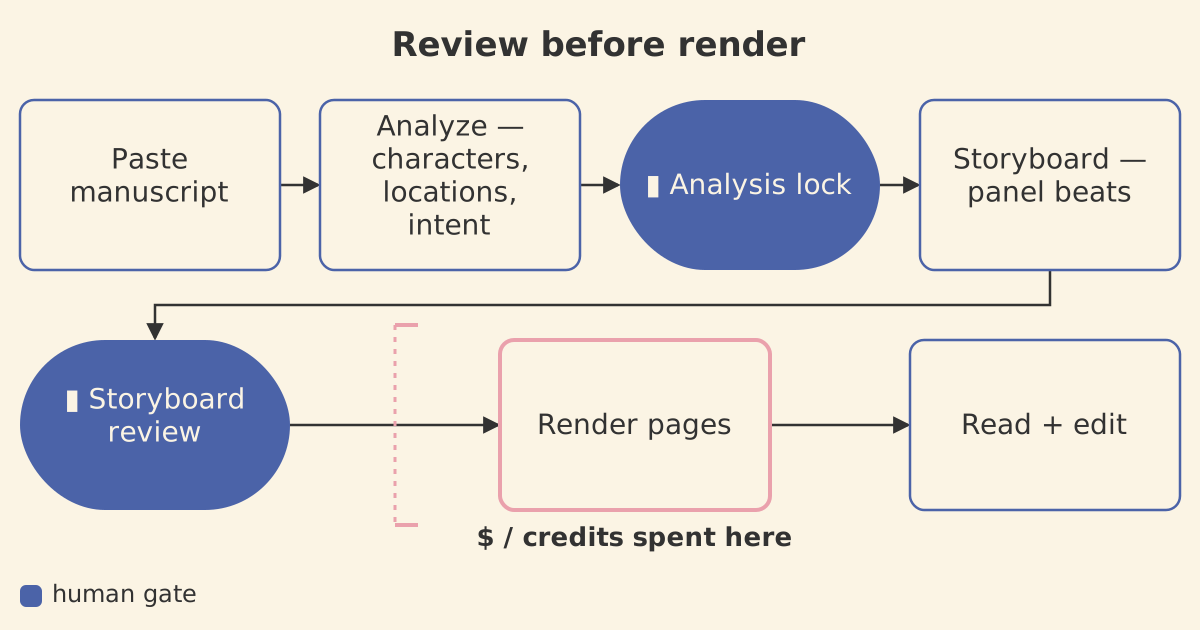
PanelMint is a guided workflow rather than a single prompt box. There are five steps, always in this order: paste the manuscript, approve the analysis, review the storyboard, render the pages, then read or edit. The app first reads the text and extracts its structure (characters, locations, story intent) and shows that for confirmation. It then proposes a storyboard: the scene broken into panel beats, with pacing and camera choices. Only after both are approved does it render images. The result is a vertical, scrolling comic you read in the app, with a Fabric.js canvas editor for fixing balloons and panels by hand.
Review before render
AI image generation is slow, expensive, and not fully predictable. If you render first and check later, you pay, in credits and queue time, for images that end up thrown away. PanelMint's design rule is review before render: expensive steps only run after a person has approved the cheap ones.
That rule appears as two gates in front of the render step. The analysis lock confirms the characters, locations, and story intent extracted from the text. The storyboard review approves the panel beats (pacing and camera) in sequence. Text is cheap to regenerate: a wrong character list caught at the analysis stage costs nothing, while the same mistake caught after a hundred rendered panels does not.
Under the workflow, the pipeline is modeled as durable state rather than a slow function call. A run's life is recorded across pipeline_runs, pipeline_events, and pipeline_jobs; a local, database-backed worker queue drains the jobs, and a worker heartbeat makes a dead worker visible instead of leaving a job silently stuck. The UI tracks a coarse mirror of that state on the episode (its status, progress, and error), and in the public API a runId is an episode.id. Because the work is persisted as runs, events, and jobs, a generation survives a reload, a crash, or a worker restart.
Before a run starts at all, a readiness gate checks every dependency: Postgres reachable, a WaveSpeed key present, local storage writable, the worker heartbeat alive, and the active-run gate clear. /api/health reports a degraded status when the generation environment is incomplete. The same principle applies throughout: failures should be visible before they cost anything.
Credits and pricing
On the hosted version, each step has a published cost: a writing step is about 80 credits, a standard image about 40 credits per panel, and a premium image about 250 credits per panel. Credits come in three packages (Starter $12 for 500 credits, Publisher $49 for 2,500, Studio $129 for 7,500), and the cost of a render is visible before you commit to it.
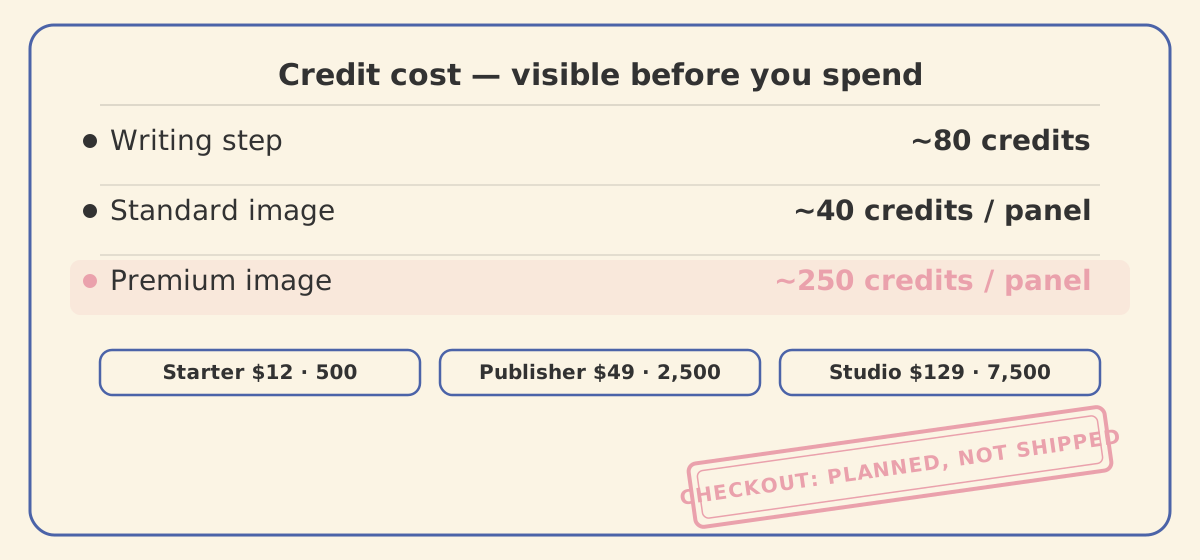
The checkout backend is not shipped yet. The pricing page shows the planned package structure and how credits map to generation cost, and states plainly that payment isn't wired up. I preferred an accurate pricing page over a checkout flow that pretends to work.
From hosted SaaS to open source
PanelMint started as a hosted SaaS: Clerk authentication, credit economics, and protected full-screen reader and editor routes. I then reworked it into an open-source, local-first tool across eight documented phases: removing hosted auth, removing billing, collapsing the provider setup to a single bring-your-own-key path (WaveSpeed, with the key read from a local .env and never stored in the database), moving the worker and the generated-asset storage onto the local machine, hardening the release process, and adding the preflight readiness gate that fronts every run.
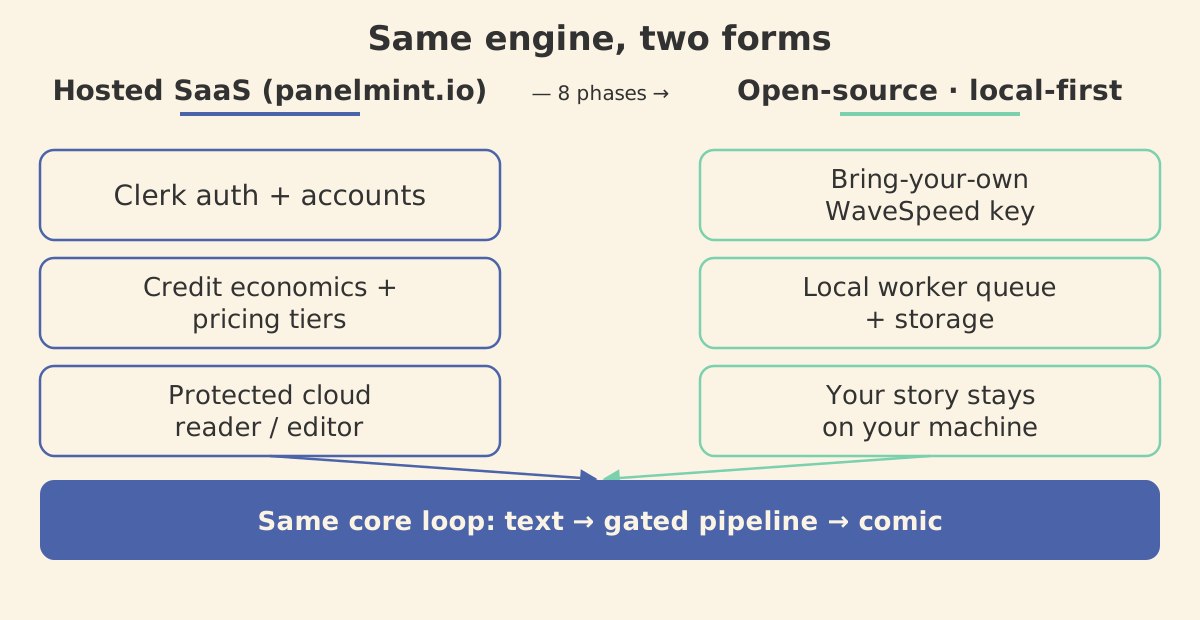
The local-first version has no accounts and no subscription: you bring a WaveSpeed key, run Postgres and a worker on your own machine, and the manuscript and rendered pages stay there. Auth, billing, and hosting were real work, but a local-first creative tool doesn't need them. Removing them left a smaller system with the same core loop: text in, gated pipeline, comic out.
What I learned
- Put a cheap review step in front of every expensive AI step. A human sign-off before a costly, unpredictable step saves more than tuning prompts after the fact.
- Model the pipeline as durable state, not a slow function. Runs, events, jobs, and a heartbeat are what let the same engine survive crashes, and survive being rebuilt from a hosted service into a local-first one.
- State costs and limitations plainly. Showing credit prices, and saying the checkout isn't built yet, holds up better than a convincing imitation of a finished product.
- Hard constraints simplify. "Local-first, bring-your-own-key" removed auth, billing, and hosting from the problem in one decision.
- Build for a need you actually have. I knew what a long-time web-novel reader would want from this tool, because I am one.